
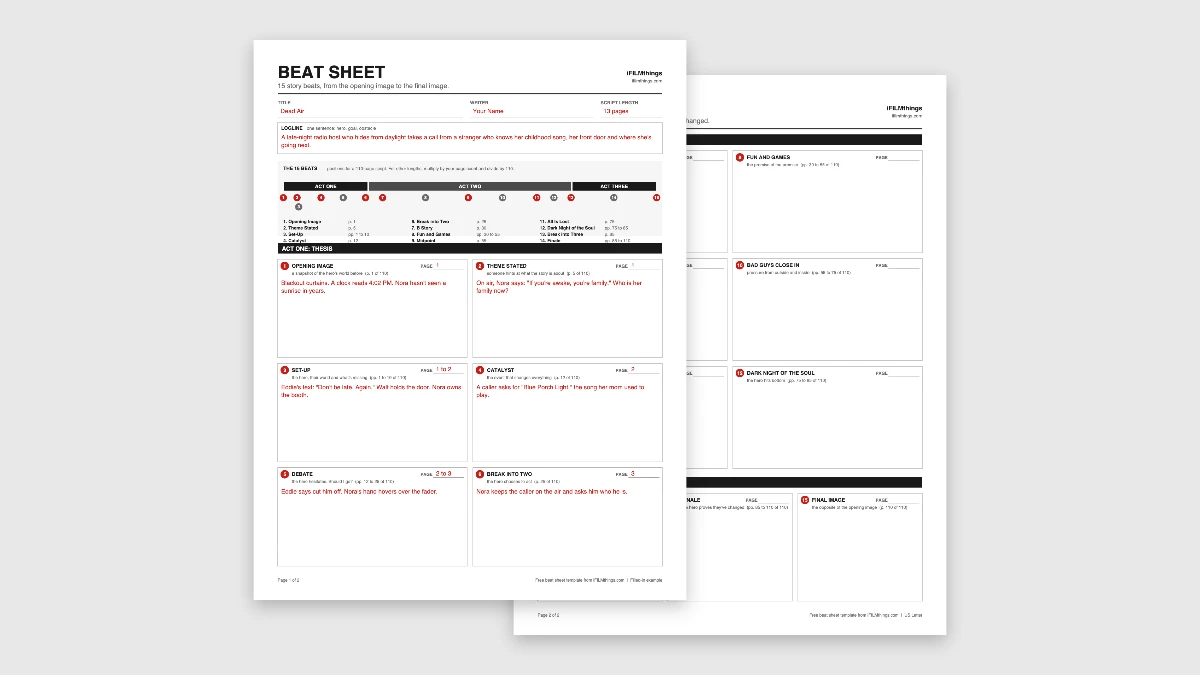
Free Save the Cat Beat Sheet Template (PDF and Google Sheets)
Most scripts don’t fall apart on page 1. They fall apart somewhere around page 40, when the setup is done and the writer has no idea what happens next. A beat sheet fixes that before you write a word of the script. This free Save the Cat beat sheet template gives you all 15 beats on two fillable pages, a Google Sheet that works out your beat pages for any script length, and a filled-in example from a short film.
TL;DR: Fifteen Beats, Three Acts, One Story
Write one or two sentences for each of the 15 beats before you start the script. Aim for the page targets (the Catalyst around page 12 of 110, the Midpoint at 55, All Is Lost at 75), then adjust for your length. If a beat is empty, that’s the part of your story that isn’t working yet.

Download the Free Beat Sheet Template
The PDF is a fillable two-page beat sheet with a box for each of the 15 beats. The spreadsheet works out your target page for every beat, with the Dead Air example on its own tab.
FREE FILMMAKING TEMPLATE VAULT
Got the Beat Sheet Template? Get the other 30.
Shot lists, release forms, budgets, schedules and more. All 31 iFILMthings templates in one place, free.
Free. Just your email.
Rather pick and choose? Browse all 31 film templates by stage.
What Is the Save the Cat Beat Sheet?
The Save the Cat beat sheet is a list of 15 story moments from Blake Snyder's 2005 screenwriting book, Save the Cat! Snyder was a working screenwriter who sold spec scripts to Disney and Amblin, and co-wrote Blank Check (1994), according to Wikipedia.
- What it does: breaks a feature script into 15 beats and tells you roughly which page each one lands on
- Why the name: the hero should do something early, like saving a cat, that makes the audience root for them, as Save the Cat! puts it
- Who uses it: screenwriters, novelists and story teams. Wikipedia notes that Disney, DreamWorks and Laika have used Snyder's script analysis
Save the Cat! is a trademark of Blake Snyder Enterprises. This free template is our own and isn't affiliated with them.
The 15 Beats With Page Numbers
These page numbers are for a 110-page feature, as listed by screenwriter Erik Bork. Single pages are moments. Ranges are sections.
| Beat | Page (of 110) | What happens |
|---|---|---|
| 1. Opening Image | 1 | A snapshot of the hero's life before the story |
| 2. Theme Stated | 5 | Someone hints at what the story is really about |
| 3. Set-Up | 1 to 10 | The hero's world, and what's missing from it |
| 4. Catalyst | 12 | The event that changes everything |
| 5. Debate | 12 to 25 | The hero hesitates |
| 6. Break into Two | 25 | The hero chooses to go |
| 7. B Story | 30 | A new relationship that carries the theme |
| 8. Fun and Games | 30 to 55 | The promise of the premise, the scenes in the trailer |
| 9. Midpoint | 55 | A false victory or a false defeat. The stakes go up |
| 10. Bad Guys Close In | 55 to 75 | Pressure from outside, doubts from inside |
| 11. All Is Lost | 75 | The worst moment. Something or someone dies |
| 12. Dark Night of the Soul | 75 to 85 | The hero hits bottom |
| 13. Break into Three | 85 | The answer arrives, often from the B Story |
| 14. Finale | 85 to 110 | The hero proves they've changed |
| 15. Final Image | 110 | The opposite of the opening image |
Writing something shorter or longer? Multiply the page by your script length and divide by 110. In a 90-page script, the Midpoint lands around page 45. The Google Sheet does this math for you.
What's in the Beat Sheet Template
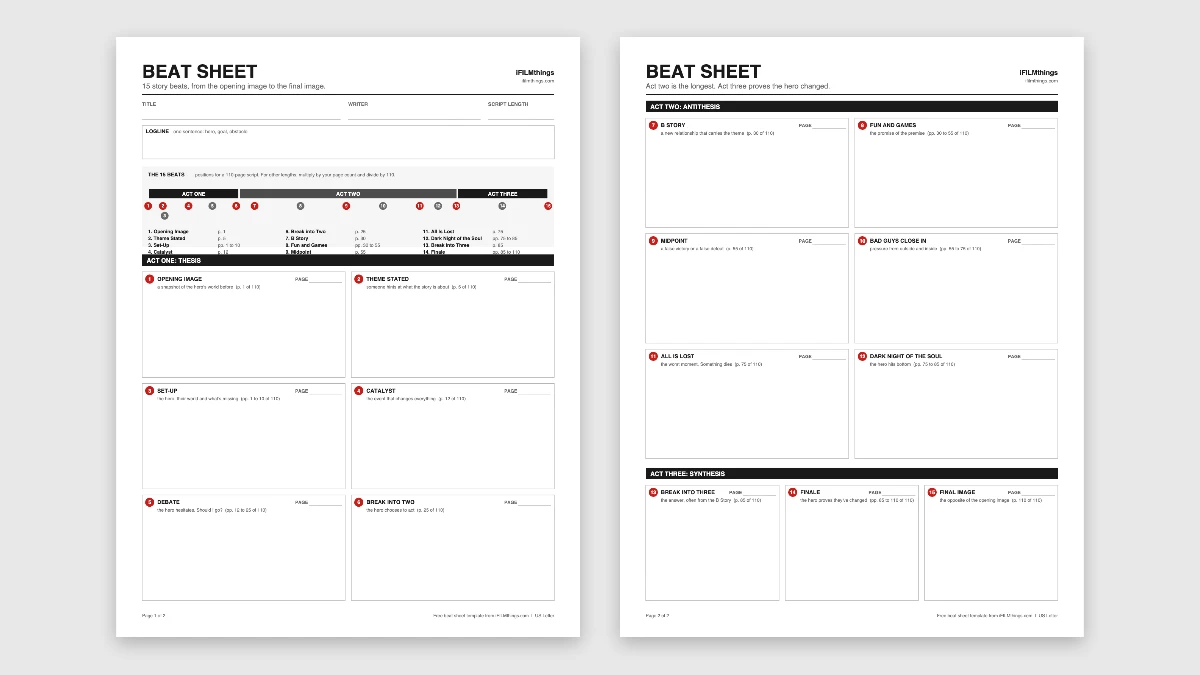
- Page 1: title, writer, script length and logline, a timeline of all 15 beats with page targets, and Act One
- Page 2: Act Two and Act Three, with a box for every beat
- Page fields: each beat has a spot for the page it actually lands on, so you can compare it to the target
- Google Sheet: type your page count and every beat's target page updates. The Dead Air example sits on its own tab
Beat Sheet Example: Dead Air
Here's the template filled in for Dead Air, the made-up 13-page short about a late-night radio host from our screenplay template.
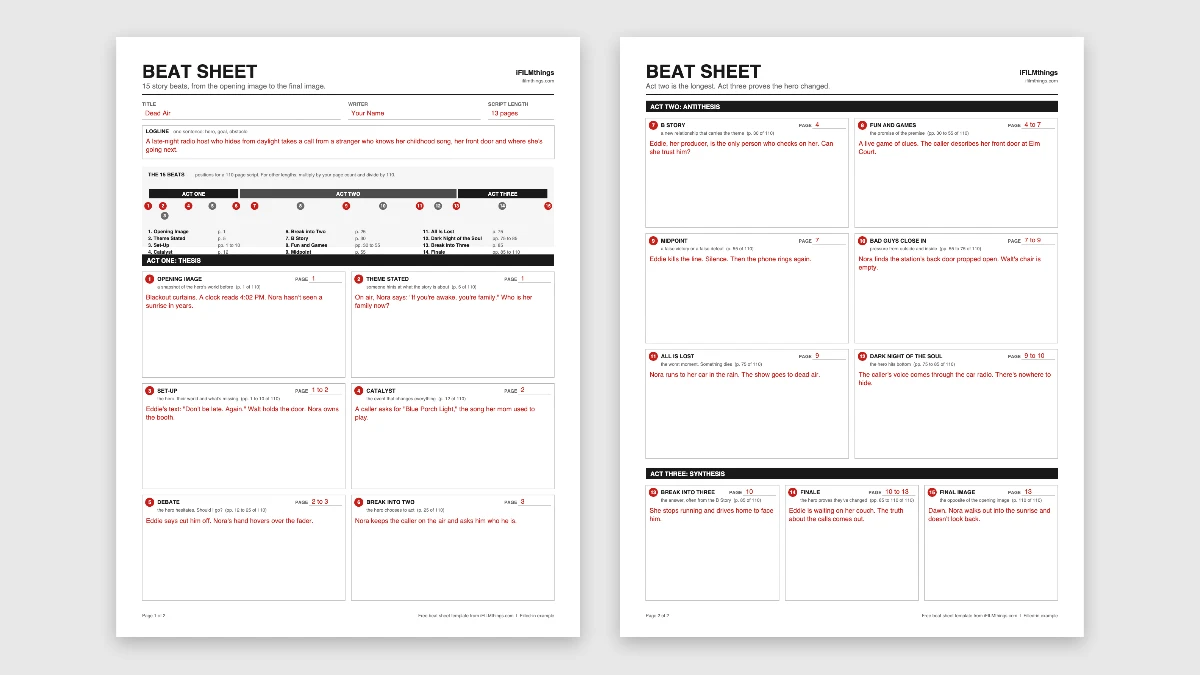
- The beats work at any length. Dead Air is 13 pages, so the Catalyst comes on page 2 and the Midpoint on page 7. The order stays the same.
- The opening and final images mirror each other. Nora starts behind blackout curtains at 4 PM. She ends by walking into a sunrise.
- The theme is one line of dialogue. "If you're awake, you're family" sounds like radio patter on page 1. By the end, it's the question the film answers.
- The Midpoint is a false victory. Eddie kills the line and the call is over. Then the phone rings again.
- The B Story carries the theme. Eddie is the one person who checks on Nora, which makes the Finale land harder.
Stuck on the middle? Go straight to beat 9.
Write your Midpoint before anything else in Act Two.
Once you know what flips at the halfway point, Fun and Games and Bad Guys Close In mostly write themselves.
How to Fill In a Beat Sheet
- Start with the logline. If you can't say the story in one sentence, the beats won't hold together. Our guide to writing a logline can help.
- Fill in the Opening and Final Images first. They show where your hero starts and where they end up.
- Add the big turns next. Catalyst, Break into Two, Midpoint, All Is Lost and Break into Three. These five hold the story up.
- Fill in the sections. Set-Up, Debate, Fun and Games, Bad Guys Close In and the Finale connect the turns.
- Keep each box short. One or two sentences. A beat sheet is a map, not a draft.
- Check the page targets. If your Catalyst lands on page 30 of a 100-page script, your setup is too long.
The Beat Sheet in a Famous Film: Aladdin

Disney's Aladdin (1992) is a clean example, and the official Save the Cat! beat sheet for Aladdin maps it this way:
- Save the cat moment: Aladdin steals bread, then gives it to two hungry kids
- Catalyst: he meets Jasmine in the marketplace and saves her from an angry merchant
- Break into Two: he goes into the Cave of Wonders
- Midpoint: the magic carpet ride. Everything seems perfect, but Jasmine still doesn't know who he really is
- All Is Lost: Jafar takes the lamp and banishes Aladdin to a frozen wasteland
- Break into Three: Aladdin accepts who he is and heads back to Agrabah
- Final Image: Aladdin and Jasmine fly off together, no disguise this time
The carpet ride is the scene everyone remembers. It sits right in the middle of the film, and it's built on a lie. That's what makes a false victory work.
Want to learn the beats faster? Watch a movie with a stopwatch.
Pick a film you love and note the time of each big turn.
Divide by the runtime. You'll see the same shape in film after film.
For other ways to shape a story, try our three act structure template, hero's journey template, Dan Harmon story circle and the Freytag's pyramid plot diagram. Once your beats are set, build your characters with our character profile template.
Once your beats are set, turn them into a short prose version of your story with our free film treatment template.
FAQs About Beat Sheets
How Long Should a Beat Sheet Be?
One or two pages. The idea is to see the whole story at a glance. If your beat sheet runs to five pages, you're writing a treatment.
What's the Difference Between a Beat Sheet and an Outline?
A beat sheet covers 15 turning points. An outline, or step outline, covers every scene in order, often 40 to 60 of them for a feature. Most writers do the beat sheet first, then the outline, then the script.
Is Save the Cat Too Formulaic?
It gets that criticism a lot. The New York Times asked whether the book caused a wave of similar-feeling studio movies or just described it. Use the beats as a checklist for problems, not a recipe. A strong story can land a beat early, late or upside down.
Does the Beat Sheet Work for Novels and TV?
Yes. The beats are about story shape, not page count. There's a Save the Cat! book for novelists, and TV writers use a shorter version for episodes. For a novel, swap page numbers for percentages of your word count.
The Final Cut on the Save the Cat Beat Sheet
A Save the Cat beat sheet gives you the shape of your story before you write it.
Download the template, fill in the five big turns first and use the Google Sheet to check your pages.
Which beat in your story is still blank?

Jay Neill
Jay Neill is the founder and managing editor of iFILMthings and believes everyone should have access to the film resources they need to plan their filmmaking project, which is why he’s dedicated iFILMthings to helping all filmmakers.